


Growie - AI Plant Identifier
3.512.00 Reviews
App Specs
- Version
- 1.1.2
- Updated On
- License
- Free
- Downloads
- 50,000+
- Developer
- Nexara Studio
- Categories
- Education
- Platform
- Android
Screenshots

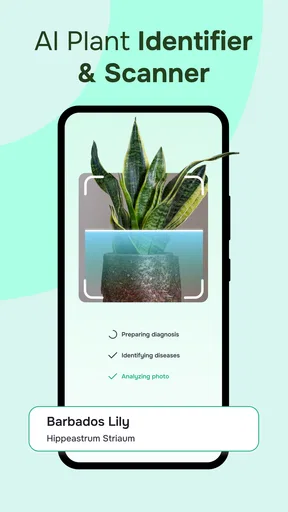
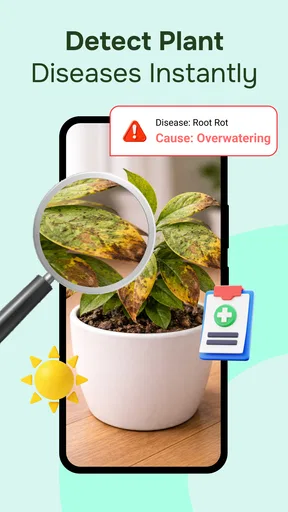

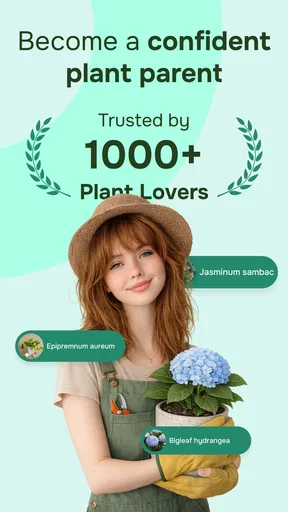
 Analysis by AppCompare
I find a plant identifier most useful when it helps me move from “What is that?” to a sensible next step: checking whether a houseplant needs different care, or simply learning the name of something along a walk. Growie - AI Plant Identifier is built around that quick photo-to-answer habit, with plant information and care guidance alongside identification. It is an education app from Nexara Studio, and its appeal is easy to understand: you can investigate a leaf or flower without first knowing which book or search term to reach for.
When the answer depends on a connection
The central identification task begins with a photograph, so I would treat a usable network connection as part of the practical experience rather than assume the app works without one. A result that needs to be processed or retrieved may take longer when reception is weak, and a garden corner with poor signal is a less convenient place to look something up than a well-connected room. I would try to take the clearest useful photo first, then run the search when the phone has a stable connection if the result does not appear promptly.
That distinction matters for a walk, a plant market, or a visit to a park: the camera can still help me collect a reference image, but an immediate answer is most dependable when the connection is behaving. I would not plan a plant-spotting outing around guaranteed instant results in a dead zone. Instead, I’d note where I found the plant and return to the image when I can complete the lookup.
Using it around the home and outdoors
Growie fits a few different routines. At home, I can check a plant whose label has disappeared, compare its appearance with the result, and use the care guide as a starting point for adjusting its spot or watering habits. Outdoors, it turns an unfamiliar shrub or flower into a small learning prompt. The useful habit is to photograph the whole plant as well as a close view of a distinctive leaf or flower when practical; that gives me a better record to consult if the first identification feels uncertain.
For a realistic example, imagine bringing home a plant from a friend and discovering that its care label is missing. I’d take a well-lit picture of its leaves, check whether the suggested identification looks plausible, and then use the care guidance to decide what to investigate next. I would not change its watering drastically on the strength of one quick match. The app can narrow the possibilities, while the plant’s actual condition and its growing environment still matter.
What to do when a scan disappoints
Plant photos are not all equally informative. A dark image, an obstructed leaf, or a plant that is damaged or between flowering stages can make identification harder; Growie can also struggle with less common plants. If the first result seems off, I’d retake the image in better light, move closer to a feature that distinguishes the plant, and compare the answer against the visible details rather than accepting a label automatically.
It also helps to separate identification from diagnosis. A suggested name is a useful lead, not proof, and care advice should be treated as a guide rather than a guarantee that one schedule suits every pot, season, or home. For a plant with a serious health problem, I’d use the image to frame a better question and seek a second opinion instead of relying on a photo result alone. That cautious approach makes the app more useful, not less: it encourages curiosity without pretending that every image can settle every question.
Worth Reading Before You Choose

EA SPORTS FC Mobile 26 Is a Bigger Football Game, but It Takes Time

Flipboard Shows What News Apps Must Do Beyond the Feed

Switching to Android Auto Means Rethinking Your Driving Routine

Google Calendar Makes a Crowded Week Easier to Manage

Ludo King Makes the Most of the Minutes Between Plans

Baby Panda World Brings Quick Play to Modern Phones, but Its Game Library Feels Busy
Connection, convenience, and personal data
Because the app is built around plant photos, I’d be deliberate about what appears in the frame. A close crop of a leaf usually tells the story better than a picture that also includes a home address, people, or other personal details. This is a simple, practical way to keep a plant lookup focused. If I’m on mobile data, I’d also save repeated searches for when I have a reliable connection, rather than repeatedly trying the same scan while reception is poor.
The experience is most appealing to people who enjoy identifying everyday greenery and want care information close at hand. It is less suited to someone who needs a definitive botanical determination, dependable diagnosis for a valuable collection, or a tool they can count on in places without connectivity. Compared with searching the web manually, a photo-led app reduces the effort of describing an unfamiliar plant; compared with a printed guide, it is quicker to try but depends more on the quality of the image and the connection available at the time.
Plans, value, and who should choose it
The app is free to install, though in-app purchases are offered at prices ranging from $6.99 to $29.99 per item. Its free starting point makes it easy to test whether photo identification and care guidance fit my habits before spending anything. I’d explore the everyday experience first, then decide whether any paid option addresses a need I genuinely have. Someone who only wants to identify an occasional plant may not need to pay; a regular plant enthusiast may find additional tools more relevant, but should weigh that against how often they will use them.
Growie has a 3.5 average from 91 ratings, with 50K+ installs. Those figures suggest a modest, established audience rather than a reason to assume every scan will be right. It is rated Everyone, runs on Android 7.0 or later, and its current version is 1.1.2. The practical takeaway is that it is accessible to a broad range of users, but expectations should stay grounded: it is a convenient learning aid, not a replacement for specialist expertise.
I’d recommend trying it if you often pause to identify plants, keep a few houseplants, or want an easy way to turn a walk into a bit of informal learning. I’d skip it if your main requirement is offline certainty or professional-grade plant diagnosis. My best tip is to treat each result as a hypothesis: take a clear photo, check whether the suggested plant fits what you can see, and use the care guidance as a prompt for further observation.
Getting Started with Growie
Downloading and setting up the app was a breeze. Available on both Android and iOS, Growie - AI Plant Identifier is free, although there are some premium features you might want to check out. Once installed, you’re greeted by a clean and intuitive interface that practically begs you to start snapping photos of plants.
The Magic of AI
Alright, so here’s where the magic happens. The app uses AI to identify plants from photos you take. I tested it with a variety of flora around my neighborhood, and I was pretty impressed. Just snap a picture and within seconds, Growie gives you a detailed description of the plant. It’s almost like having a botanist in your pocket!
The accuracy was spot-on for the most part. I tried it on common plants and was satisfied with the results. The app even provided care tips, which is super handy for someone like me who struggles to keep plants alive.
Features That Stand Out
One of the standout features is the plant care guide. This section offers detailed instructions on how to care for various plants, from watering schedules to sunlight needs. As someone who occasionally forgets to water my plants, these reminders are a lifesaver.
There's also a community feature where you can share your plant snaps and see what others are discovering. It's like Instagram but for plant geeks. It’s a fun way to connect with other users and maybe even learn a thing or two from seasoned plant lovers.
Exploring the Premium Perks
If you’re serious about your plant game, the premium version is definitely worth considering. It offers an ad-free experience, more detailed plant care tips, and even a disease diagnosis feature. Yes, you heard that right. You can diagnose plant issues just by taking a picture. It’s like having a personal plant doctor at your fingertips.
For a small fee, you also get access to a larger plant database, which is fantastic if you're dealing with rare or exotic species. I found this particularly useful when I wanted to identify some unusual plants in a botanical garden.
Room for Improvement
While Growie is generally impressive, there are a couple of areas where it could improve. The app sometimes struggles with less common plants or those that are not in perfect condition. Lighting conditions can also affect the accuracy of identification, so make sure you're snapping in good light.
Also, while the free version is great, the ads can be a bit intrusive at times. But hey, a small price to pay for such a wealth of information at your fingertips.
Final Thoughts
All in all, Growie - AI Plant Identifier is a fantastic tool for anyone interested in plants, whether you’re a beginner or a seasoned gardener. It’s easy to use, packed with information, and quite accurate, making it an essential app for identifying and caring for plants.
So, next time you’re out on a walk and spot an interesting plant, whip out your phone and let Growie do the rest. Trust me, it’s like embarking on a mini adventure each time you use it.
Pros
- Accurate plant identification using AI.
- User-friendly interface for all ages.
- Extensive plant care tips included.
- Offline mode available for remote areas.
- Supports multiple languages for global users.
Cons
- Requires premium for advanced features.
- Occasional misidentification of rare plants.
- Limited social sharing options.
- Some features need constant internet.
- In-app ads can be distracting.
FAQs for Growie - AI Plant Identifier
What is Growie - AI Plant Identifier and how does it work?
Growie - AI Plant Identifier is an innovative app designed to help users identify plants using artificial intelligence. Simply take a photo of the plant you wish to identify, and the app uses advanced image recognition technology to provide you with the plant's name and detailed information about its care and characteristics.
Is Growie - AI Plant Identifier free to use?
Growie offers a free version with basic features, such as plant identification and access to general information. However, there is also a premium version available through in-app purchases, which unlocks additional features like detailed care guides, unlimited identifications, and an ad-free experience.
What kind of plants can Growie identify?
Growie is capable of identifying a vast range of plants, including houseplants, garden flowers, trees, and even some weeds and wildflowers. Its extensive database ensures accuracy and covers thousands of plant species from around the world, making it a versatile tool for plant enthusiasts and gardeners alike.
How accurate is the plant identification feature in Growie?
The accuracy of Growie's plant identification feature is quite high due to its AI algorithms and comprehensive database. However, like any AI-driven tool, it may occasionally misidentify plants, especially if the photo quality is poor or if the plant is rare. Users can contribute to improving accuracy by providing feedback on identifications.
Does Growie require an internet connection to function?
Yes, Growie requires an internet connection to access its plant database and perform identifications. This allows the app to provide the most up-to-date information and ensures the AI can process images accurately. For those needing offline access, certain features might be limited, so an internet connection is recommended for full functionality.


